Notifications
Initiative can tell you when something wants your attention — a task landed on you, somebody mentioned you, an event is creeping up.
What you get told about, and where, is entirely yours to decide. Nothing is being pushed into your inbox on your behalf for your own good.
The channels
| Channel | What it is |
|---|---|
| Bell | The in-app bell, and the notifications page behind it. |
| Messages to your inbox. | |
| Mobile | Push notifications on your phone (needs the app, and permission). |
| Desktop | Notifications from the desktop app, whenever its window isn't the one in front. |
All of them are yours, category by category, with no minimum — the bell included. Two categories keep the bell whatever you set: Waiting on you and Your account. Somebody's waiting on your decision, or somebody changed something about your account. Neither is a thing to discover in March. Their other switches turn off like anything else.
The bell, and the page behind it
The bell holds everything you haven't read. Not the last twenty — the lot. The number says how many; opening it says what.
Everywhere else you get a dot: on the community in the left rail, then the initiative, then the tool, then the project or file in that tool's list, then the task, event or page inside it. Follow the dots inward and you land on the thing, instead of opening five communities to work out which one was buzzing.
Open it and the comments you haven't read are picked out, with the page scrolled to the first. Opening it also reads everything about it — the dots clear and the bell counts down, without you going back to click the notification.
See all, at the foot of the bell, opens the full record — read and unread, grouped by day, filterable to unread, to mentions, or to one community. Anything in it can be marked read, marked unread again, or thrown away.
A read notification stays in the record for 30 days after you read it, then clears itself out. Unread ones wait for you however long you take, including the whole of August.
Two surfaces, two jobs. The bell is what's left to deal with. The page is what happened.
Notifications arrive as they happen — a mention lands the moment it's written. Reading one clears it on your other tabs too, so you don't dismiss the same thing three times on three devices.
Click one and it stays put
It dims instead of vanishing, so the list doesn't reshuffle itself while you're still reading. It clears out when you close the bell.
Turning on mobile push
- Install the mobile app and sign in.
- In My Settings → Notifications, choose Turn on beside Push notifications.
- Say yes when your phone asks.
If push shows as Blocked, that's your phone rather than us. Open your device settings, find Initiative, and let it talk to you. We can ask; your phone decides.
What you hear about
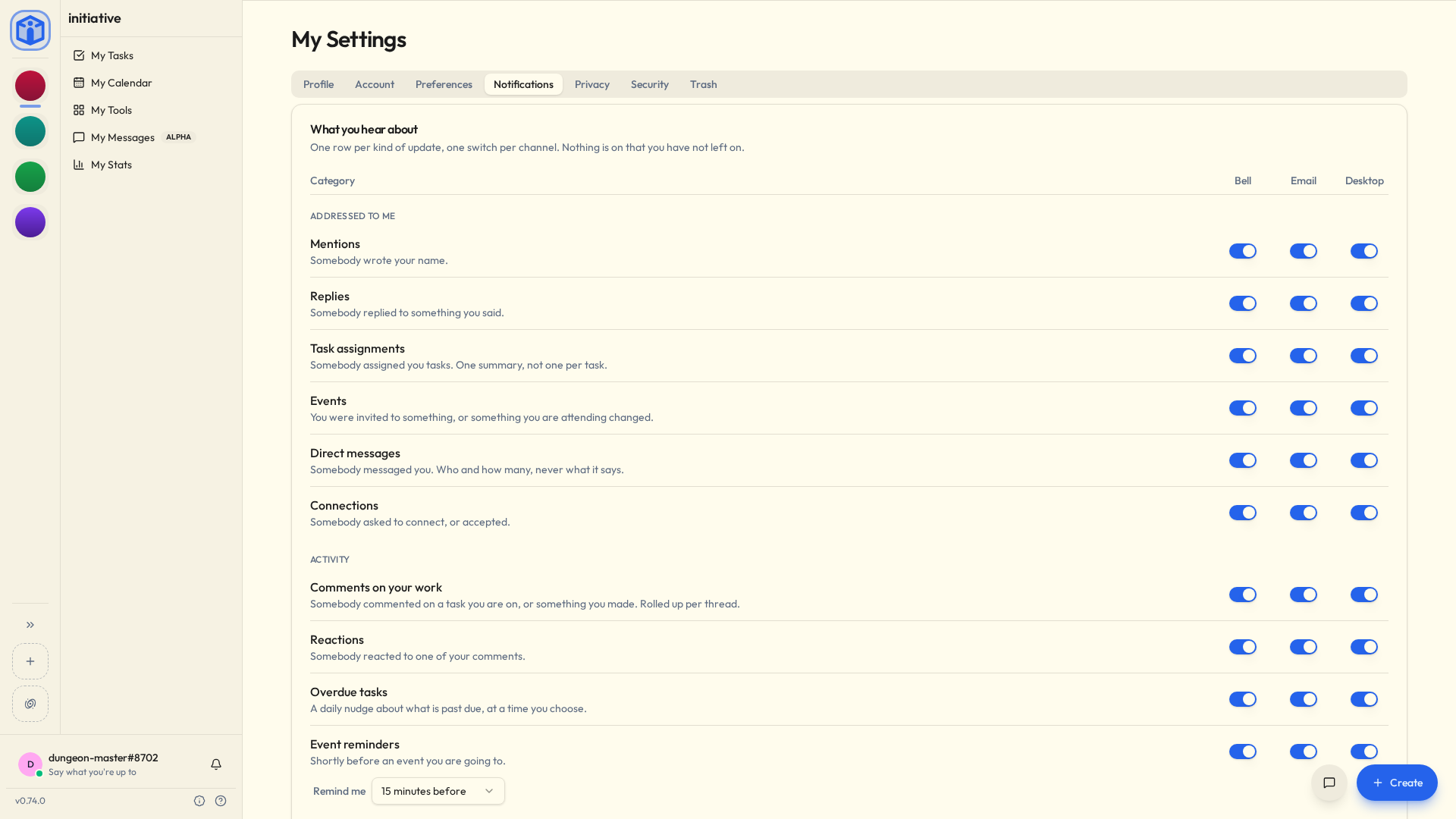
My Settings → Notifications gives you a grid: one row per category, with a Bell, Email, Mobile and Desktop switch each. Mobile appears once your server sends to phones.
| Category | You hear about it when… |
|---|---|
| Mentions | Somebody writes your name. |
| Replies | Somebody replies to something you said. |
| Task assignments | Somebody assigns you tasks (one summary, not one per task). |
| Events | You're invited to something, or something you're attending changes. |
| Direct messages | Somebody messaged you. You're told who and how many — never what it says, because nothing outside your own devices could tell you that. |
| Comments on your work | Somebody comments on a task you're on, or something you made. |
| Reactions | Somebody reacts to one of your comments (a summary). |
| Overdue tasks | A daily nudge about what's past due, at a time you choose. |
| Event reminders | Shortly before an event you're going to. |
| Joining things | You're added to an initiative, or a project appears in one. |
| Waiting on you | Somebody needs your decision — a join request, an access request. |
| Posts | A notice goes up on a board you can see. Only the people it was shared with hear about it. |
| Connections | Somebody asked to connect with you, or accepted. |
| Exports and imports | Something you asked for has finished. |
| Your account | Something was done to your account by somebody else. |
Everything here is about something you can open. A comment on a project that isn't shared with you doesn't reach you, and neither does a mention there — so somebody who wants you in a thread shares it with you first.
Mentions and Comments on your work are separate on purpose. Somebody typing your name is a decision about you. Somebody commenting on a task you happen to be on is just how busy the project got. Turn the second one down; keep the first.
When you hear about it
Everything above is whether. This is when, and it's one setting: Email arrives, under When you hear about it.
| Email arrives | What lands in your inbox |
|---|---|
| Right away | One message per thing, as it happens. The default. |
| Once an hour | On the hour, everything since the last one. |
| Once a day | One message at a time you pick. |
| Once a week | One message on a day you pick. |
Anything held comes as a single message, grouped by community and then by what it was:
Foundry
  Mentions
    Alice mentioned you in a comment on Fix the login redirect
  Comments on your work
    Alice and 2 others — 5 comments on Fix the login redirect
Acme
  Events
    Dana invited you to Sprint review (Tue 10:00)
Two things soften the edges of that:
- Things addressed to you skip the queue. A mention, a reply, a task landing on you, an invitation, a direct message — those go out straight away whatever you've chosen. The ambient stuff waits. Turn off Send things addressed to me right away if you'd rather they waited too.
- Anything you've already read is dropped. If you saw it in the bell before the email went, it doesn't go. The digest is what's still waiting, not a recap of your afternoon.
Other timings worth knowing
- Comments on the same thing arrive as one line, however many there are. Twenty comments on a task you're on is one notification naming who commented and how many — not twenty. Once you've read it, the next comment starts a fresh one, so new activity is still news.
- Mentions in a text document arrive as one line too. Somebody tidying a page that names you in four places tells you once, until you've read it.
- Task assignments arrive as one summary once the dust has settled. Somebody assigning you ten things reaches you as one message rather than ten.
- Reactions work the same way, for the same reason: they arrive in flurries.
- Overdue tasks ride along with your scheduled email. Chose weekly? You hear about them weekly, rather than being chased daily about the same list.
- Event reminders are set per event — at the start, or a chosen number of minutes, hours or days before.
Set your timezone. Genuinely.
Digests, quiet hours, due dates and repeating-task maths all run on your timezone. Initiative guesses it from your browser at sign-up and is usually right.
But if your daily email is arriving at 4am, you have not been cursed and nothing is broken. Check My Settings → Preferences.
Do not disturb
Three ways to be left alone, all under Do not disturb: one for while you're here, one for every night, and one for the fortnight in Portugal.
Don't interrupt me while I'm using Initiative
If you're sat here with Initiative open, the bell has already told you. So it doesn't also tap you on the shoulder: mobile stays quiet, and email waits about ten minutes to see whether you read it yourself. If you did, it never sends. If you wandered off, it does.
"Here" means at the keyboard — clicking, typing, scrolling. A tab left open on a second monitor since Tuesday doesn't count, and neither does a phone in a pocket.
Switch it off if you'd rather always be told.
The desktop app goes by its own window instead: it speaks up whenever that window isn't the one in front, so the next thing reaches you the moment you've gone to answer an email.
Quiet hours
Quiet hours are for every night. Set a window — 22:00 to 07:00, say — and email, mobile and the desktop hold off inside it. The bell keeps collecting quietly; it was never going to wake you. When the window ends, everything held arrives as one message, the same digest shape as above. If nothing happened, nothing arrives.
Pause notifications
Going away? Pause notifications stands email, mobile and the desktop down for the days you pick. Pick an end day and it starts now; pick a start day too and you can book the fortnight in Portugal before you leave, rather than remembering to do it at the airport. Both days are included.
While it's on, nothing reaches you — not a mention, not a direct message, not somebody typing your name in capitals. That's the point. A pause you have to keep checking isn't one.
The bell keeps collecting the whole time. When the pause ends you get one email with everything that happened, grouped the same way a digest is, minus anything you've since read. Mobile and the desktop get a count.
A digest that would have landed in the middle of a booked pause waits for the end of it too, so the days you marked off stay marked off.
Password resets arrive regardless
Pausing covers notifications. It doesn't cover the email that turns up because you just clicked "forgot password" — that isn't a notification, it's an answer.
Per community
Every community you're in gets one dial.
| Setting | What reaches you |
|---|---|
| Everything | Whatever your categories allow. The default. |
| Only what names me | Mentions, replies, tasks assigned to you, event invitations, anything waiting on your decision, and your own exports. Nothing ambient. |
| Nothing | Nothing. |
Nothing is the real one, not a quieter one. That community will not reach you, and somebody typing your name there is not an exception — a mute you have to keep checking isn't a mute.
Three things ignore the dial, because they were never a community's to silence: direct messages, connections, and your account.
Most people set the dial and never open the grid again. If you do want one community to differ category by category, it's in there.
What your server and community decide
Your settings pick from what's on offer. Two people decide what that is — whoever runs the server, and each community for itself — and both can only ever make things quieter.
Either can keep notifications inside the app, rather than reaching phones, desktops or mailboxes. Either can also ask that what does travel says the kind of thing that happened — "You were mentioned in a comment" — and leaves the details for the app. Somewhere with a rule about what may appear on a lock screen has a reason for that.
The bell always carries the whole thing, wherever those two land. It stays inside the app, so it has everything.
A switch that looks decided for you was decided in one of those two places, and whoever runs the community will know which. Your account's own post — sign-in codes, address confirmations, password resets — arrives regardless: that's correspondence, not notification.
Announcements
Notifications are about your work. An announcement is about the app itself: a version that changed something, a setting that moved, a maintenance window whoever runs the server wants you to know about.
They arrive as a dialog rather than quietly in the bell, because they're the kind of thing genuinely worth stopping you for. Some are a single card; a longer one becomes a few pages you step through with Next. Got it clears it and it doesn't come back — unless whoever wrote it asked for more than one acknowledgement, in which case the dialog says so up front.
Dismissed one at speed and immediately regretted it? Nothing is lost. The info icon in the sidebar footer opens Past announcements: everything you've been shown, newest first, read and unread marked, with a filter for the ones you haven't read. Pictures open full size on a click.
Run a server and want to write one? See Announcements.
Related
- Your space — where your tasks and events gather.
- Profile & preferences — your timezone and everything else.
- Announcements — writing them, for operators.