Messages
Sometimes the thing you need to say really doesn't belong on a task.
Messages are private conversations — two of you, or a few. They're end-to-end encrypted, which means what you write can be read by the people you sent it to and by absolutely nobody else — not a community admin, not whoever runs the server, and not us.
Open them from the Initiative logo in the top-left corner, then My Messages.
A message with a few people on it, not a room
A group message here is a thread. It has no name, no topic, no pinned post and nobody in charge of it — it's the people on it, the way a text with three friends is.
That's deliberate, because the conversation about your work has a better home. Everything in Initiative has comments — projects, tasks, files, queues, counters, calendars, dashboards, posts, the lot — so the discussion about a thing lives on that thing, where the next person finds it. And comments are searchable. Half-remember somebody saying something about the venue deposit? Search it. It comes back.
Which is the trouble with the other kind: somebody pastes the thing that should have been a document, and six months later everyone is scrolling for it, and Jenny has left, and somebody is looking at the printer in a way the printer has done nothing to deserve.
Messages are for the quiet word on the side. Sometimes three of you need to have it.
My Messages
Show: the Messages page with a conversation open — the list of people on the left, a thread on the right, and the encrypted notice under the title.
Save as en/images/guides/my-messages.png, then replace this box with:

Who can reach you
You decide, under My Settings → Privacy. The setting covers who may ask — nobody starts a conversation with you outright, whichever you pick:
| Setting | Who can ask |
|---|---|
| Private | Nobody. |
| My communities | People you share a community with — narrowable to particular communities. |
| Anyone | Anybody on Initiative, by your handle. |
Every one of these ends in a request you accept or decline. Anyone widens who may ask; it never lets somebody write to you unasked.
New accounts start Private
Which means nobody can reach you until you open it up — and your My Messages list starts empty for the same reason. Whoever runs your server picks the setting new accounts are created with, and the shipped default is Private. Changing it later affects only accounts made after the change; it never opens or closes an existing one.
Whatever you choose, a connection always lets the two of you message each other. That's the point of one.
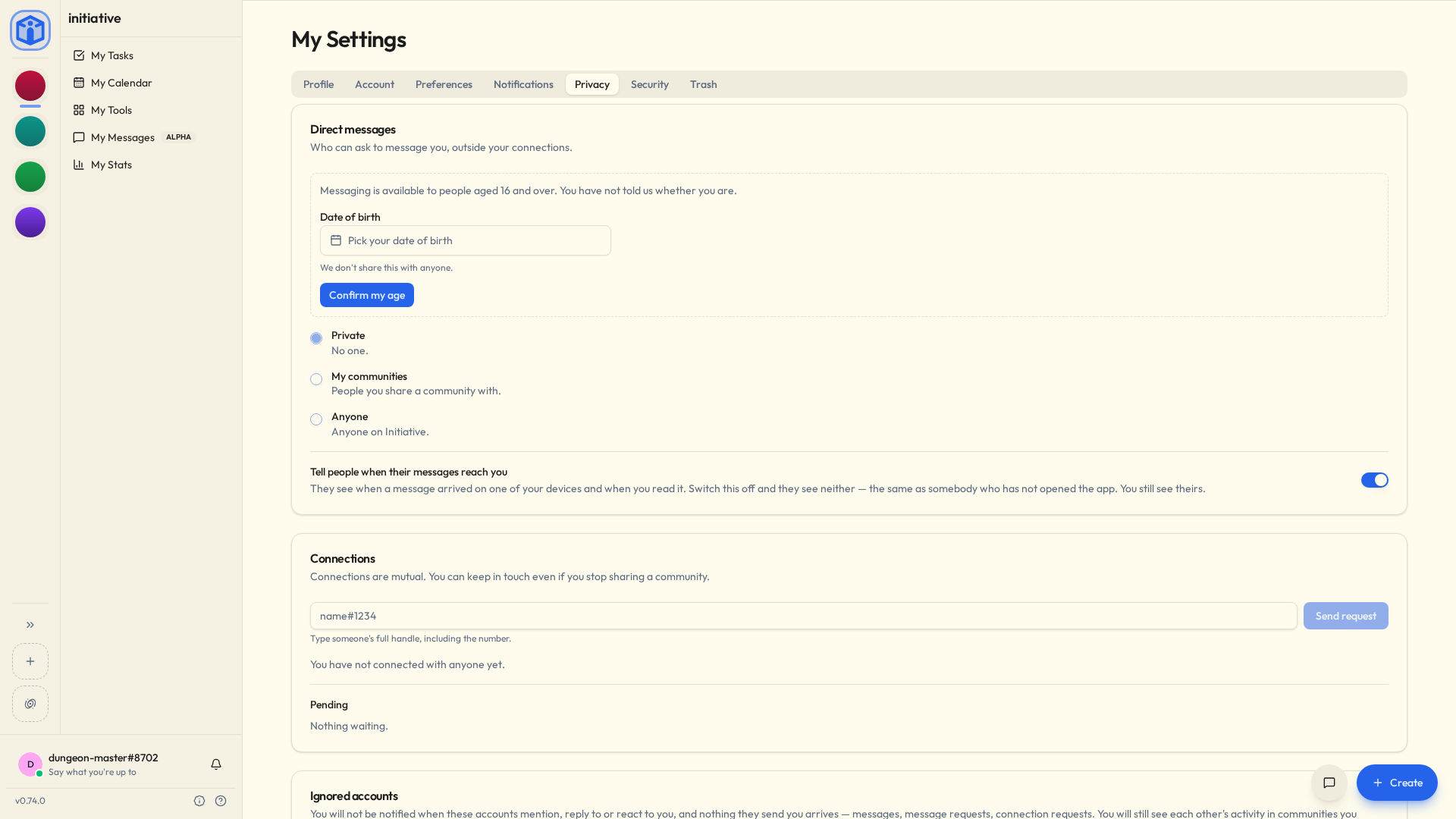
Connections
A connection is a mutual link between two accounts. Someone asks, you accept, and from then on you can reach each other — even if you stop sharing a community, or never shared one.
Add someone by their full handle, including the number (sam#1234), from My Settings → Privacy → Connections, from the + on My Messages, or from the actions menu on their profile.
Removing a connection asks you to confirm, because it may take your ability to message each other with it — Initiative tells you which case you're in before you decide.
Message requests
If you're not connected, you send a request to message. A request is exactly that: it carries no text. The other person sees that you'd like to talk, and nothing else — so a request can't be used to say something to someone who hasn't agreed to hear it.
Accept it and a conversation opens for both of you. Decline it and the request simply goes away — there's no "declined" state left hanging over anybody, and either of you can ask again another time.
Requests waiting on you are on My Messages, above the conversations, and under My Settings → Privacy → Pending.
Talking to a few people at once
Same button. Start a conversation, then keep adding people — once there's more than one, it offers Start a group with 3 people and you're making a group instead.
Everyone you name is asked, including when none of you has ever messaged before. Starting the group is the request: they see who else is on it, and nothing reaches them until they say yes.
A few things follow from a group being a thread rather than a room:
- It's called who's on it. No name to think of, no name to argue about. Propose the same people again and you land back in the thread you already have, rather than a second identical one.
- Nobody joins later. Wanting one more person is a new conversation, which everybody agrees to afresh — including the people who were already talking. It's a slightly annoying rule that buys you a real one: nobody is ever reading a thread they didn't agree to be in.
- Nobody is in charge. No owner, and no way to remove anyone. You can leave, that's it.
- Everyone has to be able to reach everyone. Not just you and them — them and them. If two people on your list can't message each other, Initiative says so while you're still choosing, and the fix is a connection or a wider privacy setting.
- At most 40 people. Well past the point where this is the right shape for the conversation, which is rather the idea.
Somebody who declined, or who left, can be asked again another time. A no is about today.
If you say yes a bit later
Nothing is held for you while you're deciding — there's no copy on the server to hold. So when you join, one of the others sends you the thread from their own device, as much of it as they still have.
Which means it might not be all of it, and it might arrive a minute after you do, and if everybody else has their laptop shut it'll turn up when one of them opens it. Genuinely the best anybody can do when the server can't read a word of it.
Ignoring someone
Ignoring is the firm answer, for when the polite one hasn't worked. From the actions menu on any profile, conversation or roster row, choose Ignore.
An ignored account stops reaching you entirely: no notification when they mention, reply to, or react to you, and nothing they send arrives — messages, message requests, connection requests. They're not told. You'll still see each other's activity in communities you share, and you can both use every tool normally, because ignoring is about contact rather than about work.
Everyone you're ignoring is listed under My Settings → Privacy → Ignored accounts. Ignore by handle there takes a full handle (sam#1234), for somebody whose profile you'd rather not go looking for.
Nothing is deleted. Stop ignoring them and everything is exactly where it was.
Your messages live on your devices
This is the bit to read before you rely on it, because it genuinely works differently from everything else in Initiative and it surprises people.
A message is delivered to your devices and then deleted from the server. There is no copy in the middle for a new device to catch up from. So:
- Each device keeps its own copy of a conversation.
- A device that wasn't there doesn't have the history. Sign in on a new laptop and your conversations are there, but they start from the moment that laptop joined them. Your other device can offer to send it across, and a group will catch you up when you join it — but there's nothing on the server to fall back on.
- Signing out takes this device's copy with it. Exactly what you want on a shared computer, and exactly what you don't want if you were hoping to read them again.
- The phone and desktop app hold on through a timeout. When the app signs you out by itself (it sat in a drawer too long, or your community asks for a fresh sign-in every so often), your messages are there when you sign back in. A browser lets them go either way, because a browser might be the library's. So the app is the place to keep the conversations that matter.
If the person you're writing to has never opened Messages, there's no device to deliver to yet, and Initiative tells you so rather than pretending the message went.
Adding a device
Sign in somewhere new and your other devices ask New device signed in. If it's yours, tap Verify and keep both open side by side. Each shows the same four pictures, and you tap They match on both. That's the whole ceremony. Tick the box first if the new device should get your message history.
The pictures are different every time, so there's nothing to write down or remember. If they don't match, tap They don't match: nothing changes, and you can try again. If you've never heard of the device, Not mine, remove it takes it off your account.
When somebody you talk to adds or replaces a device, the conversation says so in one quiet line, where it happened. There's nothing to do about it. It's there so it isn't a surprise.
Notifications
You'll be told that somebody messaged you, and how many times. Never what they said, because nothing outside your own devices is capable of telling you that.
Turn it on or off under My Settings → Notifications → Direct messages, like any other category. A flurry of messages arrives as one notification rather than twenty, because twenty would be a punishment.
See Notifications.
What this means for community admins
Messages are not community content. A community admin can reach everything in their community — every project, file and task — and that authority stops at the edge of a private conversation. Messages don't appear in exports, they can't be searched, and there is nothing to moderate, because there is nothing to read.
The tools that do work are the ones above: people control who can reach them, and ignoring ends contact without needing anyone's help. If an account is behaving badly, report the account — see Reporting a problem.
Related
- Private messages — what encryption does and doesn't cover, and what can be handed over.
- Your space — finding the people you know.
- Notifications — choosing what you're told about.